Rust 总览
说明
- 本文档作为 Rust 语言与常用开发流程的总览入口.
- 旧版零散 Rust 记录中关于
Pin/Unpin的内容已并入本文. - 更偏概念速记的内容可参考 Rust 要点, 工具类内容可参考 Rust 工具, 调试排错可参考 Rust 调试技巧.
建议阅读路径
- 初学语法和所有权问题时, 先看
Rust 要点与当前总览页. - 需要工具链, 构建和排错时, 优先看
Rust 工具,Rust 调试技巧,Rust 问题汇总. - 需要框架或平台专题时, 再进入
egui,Dioxus,Tauri,Rust for Android,wasm等专题页.
专题入口
- Rust 迭代器技巧
- Rust 宏
- Servo 构建记录
- [Rust crate 工具集](./rust crate 工具集.md)
- guillotiere
- OpenRA 构建记录
- Rust for Windows 7
代码示例归档
- 运行型实验工程可参考 Rust 代码示例归档.
- 其中网络方向可继续看 libp2p relay 示例运行记录.
- USB 方向可继续看 rusb 和 test_usb 实验目录说明.
目录边界
program/rust/主要承载语言知识, 框架使用和工具链专题.- 可运行型历史实验工程集中放在
program/rust/code/和program/rust/test_usb/. - 若内容更偏前端 UI 或 Web 工程归档, 应回到
frontend/或program/web/.
在 .config/config.toml 中设置默认编译目标
# out-dir 需要添加编译选项 cargo build -Z unstable-options

[build]
target = "i686-pc-windows-msvc"
out-dir = "D:/programs/ehTestCore_V1.2.1.13/plugin"
在 Cargo.toml 中指定 target, nightly
cargo-features = ["per-package-target"]

[package]
default-target = "i686-pc-windows-msvc"
TAB 键 自动补全
参考: https://rust-lang.github.io/rustup/installation/index.html#enable-tab-completion-for-bash-fish-zsh-or-powershell
for linux
mkdir -p ~/.local/share/bash-completion/completions rustup completions bash >> ~/.local/share/bash-completion/completions/rustup
cargo 命令
安装常用的工具:

    # 扩展cargo, 允许对 dependencies 的增删改
    # 查看依赖关系
    # 基于模板生成项目
    # 宏展开
    cargo install cargo-edit cargo-tree cargo-generate cargo-expand

    ps:
        cargo-edit 部分命令:
            cargo add <crate>
            cargo add <crate> --allow-prerelease, 允许使用beta版本的库
            cargo rm <crate>
            cargo upgrade

        cargo-tree 部分命令:
            cargo tree
            cargo tree -e features
            cargo tree -f "{p} {f}"

    # 文档生成, 及插件: 用于数学表达式, 生成流程图表
    cargo install mdbook mdbook-katex mdbook-mermaid

# 创建项目
cargo new hello_cargo

# 编译 并生成可执行程序
cd hello_cargo
cargo build
cargo build --release
cargo build --target thumbv7m-none-eabi

# 编译 但不生成 可执行程序
cargo check

# 运行目标程序 (也可以一步构建项目)
cargo run

# 创建
cargo new hello_world <--bin>, 创建一个二进制程序
cargo new hello_world --lib, 创建一个库

# 参数

不使用默认的features:
    --no-default-features

    指定features:
        --features="FEATURE1 FEATURE2 ..."

# 显示详细的编译信息, 包括 build.rs 中的 print
cargo build -vv

# 安装 binutils 工具
cargo install cargo-binutils
rustup component add llvm-tools-preview
VSCode 中 Rust 插件
1. rust-analyzer
2. Crates
3. Even Better TOML
4. CodeLLDB
Ownership
1. Rust 中的每一个变量都有一个 owner
2. 在同一时刻 owner 只有一个.
3. 当 owner 离开作用域时, 它的值将会被丢弃
References and Borrowing
& 引用
* 解引用

mut 可变
默认不可变

借用, 即 获取引用作为函数参数

ps:
   1. 在任意给定时刻, 只能拥有一个可变引用或任意数量的不可变引用 之一 (而不是两者)
   2. 引用必须总是有效的
Lifetimes
第一条规则是每一个是引用的参数都有它自己的生命周期参数

第二条规则是如果只有一个输入生命周期参数, 那么它被赋予所有输出生命周期参数

第三条规则是如果方法有多个输入生命周期参数并且其中一个参数是 &self 或 &mut self, 那么所有输出生命周期参数被赋予 self 的生命周期
Pin 与 Unpin
参考: https://folyd.com/blog/rust-pin-unpin/
Pin 自身是一个智能指针包装器, 因为它实现了 Deref 和受约束的 DerefMut.
Pin 包裹的内容通常应该是某种指针类型, 而不是普通值类型, 例如 Pin<u32> 一般没有意义.
Pin 的核心语义是“钉住”被包裹对象, 防止其在内存中移动. 这个语义是否真正生效, 取决于目标类型是否实现了 Unpin.
- 如果
T: Unpin, 那么Pin<P<T>>基本等价于P<T>, “钉住”语义不会真正限制移动. - 如果
T: !Unpin, 那么从被Pin包裹到被销毁期间, 必须保证它保持在固定位置.
Unpin 是一个 auto trait, 编译器默认会为大多数类型自动实现它. 常见例外包括:
PhantomPinnedasync/await降糖后生成的某些Future状态机
#![allow(unused)]
fn main() {
pub struct Pin<P> {
    pointer: P,
}

impl<P: Deref> Deref for Pin<P> {
    ...
}

impl<P: DerefMut<Target: Unpin>> DerefMut for Pin<P> {
    ...
}
}
一个典型的 !Unpin 例子:
#![allow(unused)]
fn main() {
struct Test {
   a: String,
   b: *const String,
   _marker: PhantomPinned,
}
}
如何理解 Pin<P<T>>
- 如果
P<T>符合Unpin, 那么Pin<P<T>>不会真正把它“钉住”. - 如果
P<T>不符合Unpin, 那么从被Pin包裹到销毁期间, 都要保证它不发生移动.
Rust 的 安装与卸载
参考链接:
    https://www.rust-lang.org/zh-CN/tools/install

安装:
    curl --proto '=https' --tlsv1.2 https://sh.rustup.rs -sSf | sh

版本号:
    rustc --version

升级:
    rustup update stable
    rustup update

使用 不同 版本:
    rustup default stable
    rustup default nightly

添加工具:
    cargo install cargo-generate
    cargo install cargo-edit
    cargo install mdbook

卸载:
    rustup self uninstall
使用特定的 rust 版本
参考: https://doc.rust-lang.org/edition-guide/rust-2018/rustup-for-managing-rust-versions.html

rustup toolchain install nightly-2020-11-19
rustup toolchain list
rustup default nightly-2020-11-19

ps:
    "2020-11-19" 这个时间是在 rust 的 git 中的tag上找的

# 安装 nightly 版本的工具链
rustup toolchain install nightly

# 对当前项目使用 nightly
rustup override set nightly

# 对所有项目使用 nightly
rustup default nightly
指定 默认编译器
创建 rust-toolchain.toml 文件, 添加:
[toolchain]
channel = "nightly-2024-01-05"
components = [
  "cargo",
]
cargo 指定编译器 报错:
'cargo.exe' binary, normally provided by the 'cargo' component, is not applicable to ..
rustup component remove cargo
rustup component add cargo
一些额外的命令
输出 详细的编译命令
cargo build --build-plan -- -Z unstable-options > build.json
riscv
rustup target add riscv32imac-unknown-none-elf
stm32
rustc install thumbv7m-none-eabi
rustup target install thumbv7m-none-eabi
cargo build --target thumbv7m-none-eabi
vscode 中 rust 的插件
1. rust-analyzer
2. Crates
3. Better TOML
4. CodeLLDB
Rust hello_world
编写点一个程序:
    vim main.rs

    fn main() {
        println!("Hello, world!");
    }

编译:
    rustc main.rs

运行:
    ./main
Rust 编译过程
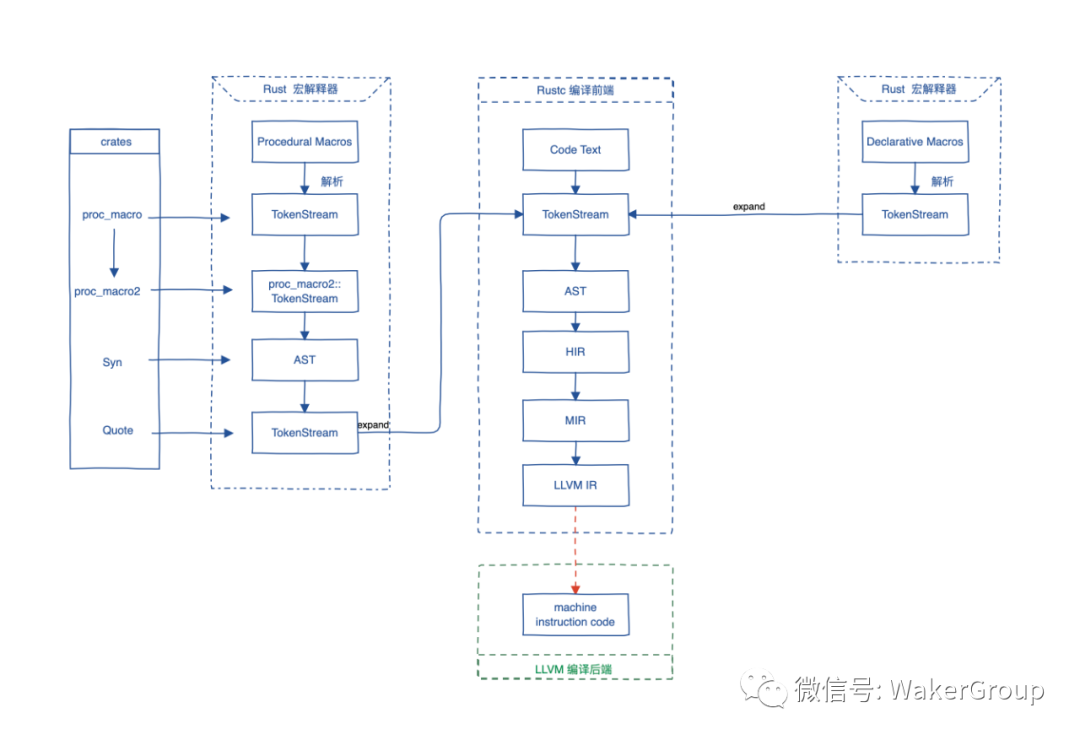
Rust 编译器(rustc)是一个编译器前端, 它负责把文本代码一步步编译到 LLVM 中间码(LLVM IR), 再交给 LLVM, 最终生成机器码, 所以 LLVM 是编译器后端.
宏展开 –> 语法语义分析 –> 生成抽象语法树 –> LLVM IR (LLVM 中间语言) –> 通过 LLVM 生成机器码
使用 Cargo 创建项目
创建项目 hello_cargo:
    cargo new hello_cargo

cd hello_cargo

编译 并生成可执行程序:
    cargo build
    cargo build --release

编译 但不生成 可执行程序:
    cargo check

运行目标程序 (也可以一步构建项目):
    cargo run

创建:
    cargo new hello_world <--bin>, 创建一个二进制程序
    cargo new hello_world --lib, 创建一个库
库
kurbo
    曲线工具

lyon
    路径细分库, 可以用于基于GPU的2D图形渲染


tokio
    https://github.com/tokio-rs/tokio

embedded_graphics
    mcu gui

embedded_sdmmc
GUI 开发
iced
sudo apt install libssl-dev

官方的例子:

    git clone https://github.com/hecrj/iced.git

    cd iced

    cargo build

    // --features glow,glow_canvas
    cargo run --package todos

// 如果无法运行, 就安装下面的软件包
sudo apt install libvulkan1 mesa-vulkan-drivers vulkan-utils
iced: 编译 并 运行所有的 examples
#!/bin/bash

examples=(iced_core iced_futures iced_graphics iced_native iced_style iced_glow iced_glutin iced_winit iced_web iced_wgpu bezier_tool iced clock color_palette counter custom_widget download_progress events game_of_life geometry integration pane_grid pick_list pokedex progress_bar qr_code scrollable solar_system stopwatch styling svg todos tour)

for example in ${examples[@]}; do
    cargo build --verbose --package $example
done

for example in ${examples[@]}; do
    echo "start run: cargo run --verbose --package $example"
    cargo run --verbose --package $example
done
iced 例子
学习基本的布局:
    target/debug/pane_grid
    examples/tour

学习canvas:
    examples/clock
bevy, 游戏引擎
git clone https://github.com/bevyengine/bevy
cargo run --example breakout
libusb, usb 库
https://stackoverflow.com/questions/1710922/how-to-install-pkg-config-in-windows


在windows上找不到libusb库, 在 ~/.cargo/config 中添加:

[target.x86_64-pc-windows-msvc.'usb-1.0']
rustc-link-search = ['D:\libs\64bit']
rustc-link-lib = ['libusb-1.0']
wasm 开发
安装 wasm-pack:

    curl https://rustwasm.github.io/wasm-pack/installer/init.sh -sSf | sh

cargo install cargo-generate

cargo generate --git https://github.com/rustwasm/wasm-pack-template -n wasm-app

cd wasm-app
wasm-pack build

npm init wasm-app www

cd www
yarn

cd ../pkg
yarn link

cd ../www
yarn link "wasm-app"
vue vite rust wasm
yarn create @vitejs/app my-vue-app --template vue

cd my-vue-app
yarn add -D vite-plugin-rsw

yarn

cargo generate --git https://github.com/rustwasm/wasm-pack-template -n wasm-app

vite.config.js:

    import { defineConfig } from "vite";
    import vue from "@vitejs/plugin-vue";
    import ViteRsw from 'vite-plugin-rsw';

    // https://vitejs.dev/config/
    export default defineConfig({
        plugins: [
            vue(),
            ViteRsw({
                mode: "release",
                crates: ["wasm-app"],
            }),
        ],
    });
异步
impl Future for Server

Server实例就可以直接使用 .await 了
汇编
https://godbolt.org/ 二进制浏览器
rust 编译选项
在 build.rs 中
#![allow(unused)]
fn main() {
println!("cargo:rustc-link-arg=-fPIC");
}
在 .config/config.toml 中
[target.arm-unknown-linux-gnueabihf]
rustflags = [
    # "-Clink-arg=-Tsrc/linker.ld",
    # "-Cforce-frame-pointers=yes"

    # "-C", "linker=arm-linux-gnueabihf-ld",
    "-C", "linker=arm-linux-gnueabihf-gcc",
    "-C", "relocation-model=pic",
    "-C", "target-feature=+crt-static",

    # LLD (shipped with the Rust toolchain) is used as the default linker
    # "-C", "link-arg=-Tlink.x",
]
调试 rust dll
.vscode\launch.json
{
    "type": "lldb",
    "request": "launch",
    "name": "ehTestCore",
    "program": "xxx.exe",
    "args": [],
    "cwd": "xxx",
    "stopOnEntry": false,
    "sourceLanguages": [
        "rust"
    ],
    "sourceMap": {
        "/rustc/73c9eaf21454b718e7c549984d9eb6e1f75e995c": "C:/Users/maxu/.rustup/toolchains/nightly-x86_64-pc-windows-msvc/lib/rustlib/src/rust"
    }
},
rust 的标准库 调试, 需要添加下面的内容, 其中 rustc 后面的 commit-hash 可以通过命令获得:
"sourceMap": {
    "/rustc/73c9eaf21454b718e7c549984d9eb6e1f75e995c": "C:/Users/maxu/.rustup/toolchains/nightly-x86_64-pc-windows-msvc/lib/rustlib/src/rust"
}
rustc -Vv | grep commit-hash | cut -d' ' -f 2
静态 c++ 运行时库
[build-dependencies] static_vcruntime = “2.0”
rust-toolchain.toml
[toolchain]
channel = "1.77.2"
windows 系统编译报错, #![cfg_attr(feature = "stdsimd", feature(stdsimd))]
[toolchain]
channel = "nightly-2024-02-05"
打印配置
rustc –print cfg
显示版本
cargo –version –verbose